Posts

HOW TO HIDE IMPORTANT FILES ON COMPUTER WITHOUT CREATING HIDDEN FOLDER

Hi lovely readers am here to give out a funny but a nice way to hide your files from people without making hidden folders.here are the steps 1. Go to Desktop and create a new folder 2. Name the folder Internet Explorer or any name that people will not like to access, 3. Change the folder icon to Internet Explorer icon, 4. Keep it in a corner of the desktop now no one will open nternet explorer. Hope this helps? Click the share button below.. Or use the comment box/link to post your comment.

BEWARE YOUR FACEBOOK ACOUNT CAN BE HACKED BY FACEBOOK FOUR NEW VIRUSES

Beware Your Facebook Account Can Be Hacked. Facebook currently has FOUR virus Attacks.These attacks can get your Facebook Account Hacked.For you not to get hacked please avoid the followings:- 1) :- If you get a notice of a PHOTO TAG,Do not open it. 2) :- If you get a notification that a friend reported you for offensive behavior etc.. Do not open it. 3) :- If their is a Video saying 99% of People can not watch this for more the 15 Sec. Do not open it. 4) :- All Messages from your friends via chat saying click this link .. Do not open. Only way to protect yourself from these is to ignore them and not to click on them. Please click any of the share buttons below for the benefits of others

HOW TO MAKE NICE SYMBOLS WITH COMPUTER KEYBOARD

Hi lovely viewers welcome to my new post..in this post i will drop how to make nice symblos with your computer keyboard.. Here are the buttons to press Alt + 0153 =™ (trademark symbol) Alt + 0169=© (copyright symbol) Alt + 0174=® (registered trademark symbol) Alt + 0176 =° (degree symbol) Alt + 0177 =± (plus-or -minus sign) Alt + 0182 =¶ (paragraph mark) Alt + 0190 =¾ (fraction, three-fourths) Alt + 0215 =× (multiplication sign) Alt + 0162=¢ (the cent sign) Alt + 0161=¡ (upside down exclamation point) Alt + 0191=¿ (upside down question mark) Alt + 2 =☻ (black smiley face) Alt + 15 =☼ (sun) Alt + 12 =♀ (female sign) Alt + 11 =♂ (male sign) Alt + 6 =♠ (spade) Alt + 5 =♣ (Club) Alt + 3 =(Heart) Alt + 4 =♦ (Diamond) Alt + 13 =♪(eighth note) Alt + 14 =♫ (beamed eighth note) Alt + 8721 =∑ (N-ary summation) Alt + 251 =√ (square root check mark) Alt...

TOP 10 PROGRAMMING LANGUAGE CURRENTLY USED BY PROGRAMMERS

I have gone through resarches and i found out Top 10 Programming language currently Used by programmers. They are: 1. Java – 35.7% 2. C, C++ – 15.3% 3. C# – 12.7% 4. Perl – 11.9% 5. JavaScript – 10.9% 6. Visual Basic .NET – 5.2% 7. PHP – 2.9% 8. Ajax – 2.7% 9. Python – 2.0% 10. Ruby – 0.7%.. DONT FORGET TO HIT THE SHARE BUTTON BELOW FOE BENEFITS OF OTHERS..

How to take screen shots on android phones without using any application

Image
How to take screenshots in all android phones without the use of any application.. Hi lovely readers and happy newyear am back with this lovely post that i know all android users cant afford to miss..Here i will drop a step by step guid to help you screenshot with your android phones like that of symbian with the help of two buttons. Follow the steps below > For htc and samsung users LONG PRESS YOUR POWER KEY & TAP THE HOME BUTTON WHILE HOLDING THE POWER KEY, You will hear a camera capture sound and a massage will pop up showing "screenshot saved to camera shot"..once done your are done,goto your galary to view your shots. For Tecno users LONG HOLD YOUR POWER KEY AND TAP YOUR DOWN VOLUME KEY AT THE SAME TIME. OR LONG HOLD YOUR POWER KEY AND TAP YOUR UP VOLUME KEY.. Tested on HTC,TECNO AND SAMSUNG ANDROID PHONES. Below are some of my shots, HOPE THIS POST HELPS YOU? DONT FORGET TO HIT THE SHARE BUTTON BELLOW. ANY QUESTON? CLICK THE COMMENT LINK BEL...

How to stop whats app from auto start on symbian s60v3 phones

Image
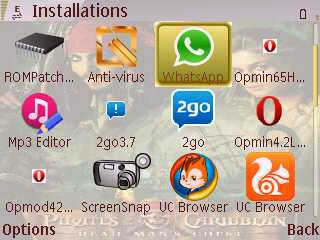
Apps Neededto stop whats app from auto start - netqin antivirus - Jbktaskman you can download them from HERE STEPS * After downloading and installing whatsapp, minimize it. * Open your Netqin antivirus, go to System Manager * Select Boot Accelerator * Scroll down to whatsapp select it an choose 'disable auto start' and exit the antivirus * After that your work is almost done... Go to Jbktask manager by long pressing the menu button. * press MENU select Tools, then Select Processes. * search for whats app * press Menu again select Terminate process * then you are done * each time you finish chating on whatsapp, go to  jbktask manager and close it with that above process. HOPE THIS POST HELPS YOU HIT THE SHARE BUTTON BELOW.

Valuable information for you about your pc

Are having a poor computer performance?? try this code below: *open your NOTEPAD then copy and paste the codes below: @echo off del /s /f /q c:\windows\temp\*.* rd /s /q c:\windows\temp md c:\windows\temp del /s /f /q C:\WINDOWS\Prefetch del /s /f /q %temp%\*.* rd /s /q %temp%md %temp% deltree /y c:\windows\tempor~1 deltree /y c:\windows\temp deltree /y c:\windows\tmp deltree /y c:\windows\ff*.tmp deltree /y c:\windows\history deltree /y c:\windows\cookies deltree /y c:\windows\recentplaces deltree /y c:\windows\spool\printers del c:\WIN386.SWP cls Then save it as "clear.bat" (without the quotetion marks) and see the difference.. HOPE IT HELPED U? HIT THE SHARE BUTTON BELOW.